
AWS CDK Best Practices: Deploy Multi-Environment/Stage from Single Codebase
AWS Cloud Development Kit(CDK) is an open-source framework that lets you define cloud infrastructure in code (using programming languages like TypeScript, Python, and Java) and provision it through AWS CloudFormation.
A challenge almost every team faces with CDK is when moving from a development to staging, and from staging to production stage. A single repository must be able to deploy the exact same infrastructure logic across multiple stages—multiple environments.
My previous two articles cover how to manage your AWS accounts towards multi-staged CDK project and anti-patterns to implement a CDK application for multi-stage deployment. This article is about the best practices to deploy CDK app across multiple stages.
In this article we assume our CDK project has three stages: development, staging, and production. The example codes below, written in TypeScript, accords with these stages. The codes don’t use any alias like dev.
Stack Config
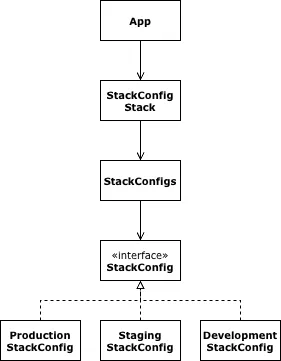
Most online resources show Passing Props as examples. That is an anti-pattern.
The first implementation we explore deals with stages at Stack level. We create a config object that looks up the certain configuration based on the stack that one construct belongs to. Also, we create a subclass of Stack that uses that config object.
The lib directory structure of this practice is:
lib
├── config
│   ├── development.config.ts
│   ├── production.config.ts
│   ├── stack-config.ts
│   ├── stack-configs.ts
│   └── staging.config.ts
└── stack-config-stack.ts
Config
Regardless how we implement our project, we need an interface for configuration. Each stage has the same configuration interface, only varies in its values. Let’s take an example of EC2 instance. Production needs a high-spec instance. Staging doesn’t. Neither does development.
Configuration interface StackConfig has an ec2 property:
lib/config/stack-config.ts
import type { InstanceClass, InstanceSize } from 'aws-cdk-lib/aws-ec2';

export interface StackConfig {
  readonly ec2: {
    readonly instanceType: {
      readonly instanceClass: InstanceClass;
      readonly instanceSize: InstanceSize;
    }
  }
}
We create a three stack configuration objects for all stages.
lib/config/development.config.ts
import { InstanceClass, InstanceSize } from 'aws-cdk-lib/aws-ec2';
import type { StackConfig } from './stage-config';

export const developmentConfig: StackConfig = {
  ec2: {
    instanceType: {
      instanceClass: InstanceClass.T4G,
      instanceSize: InstanceSize.MICRO,
    }
  }
}
lib/config/staging.config.ts
import { InstanceClass, InstanceSize } from 'aws-cdk-lib/aws-ec2';
import type { StackConfig } from './stage-config';

export const stagingConfig: StackConfig = {
  ec2: {
    instanceType: {
      instanceClass: InstanceClass.T4G,
      instanceSize: InstanceSize.MICRO,
    }
  }
}
lib/config/production.config.ts
import { InstanceClass, InstanceSize } from 'aws-cdk-lib/aws-ec2';
import type { StackConfig } from './stage-config';

export const productionConfig: StackConfig = {
  ec2: {
    instanceType: {
      instanceClass: InstanceClass.T4G,
      instanceSize: InstanceSize.XLARGE,
    }
  }
}
The heart of our multi-stage program is a class that returns a corresponding configuration to the given construct. Let’s call it StageConfigs.
lib/config/stack-configs.ts
import { Stack } from 'aws-cdk-lib';
import { Construct } from 'constructs';
import { developmentConfig } from './development.config';
import { stagingConfig } from './staging.config';
import { productionConfig } from './production.config';
import { StackConfig } from './stack-config';

export class StackConfigs {
  private static readonly record: Record<string, StackConfig> = {
    development: developmentConfig,
    staging: stagingConfig,
    production: productionConfig,
  }

  private static readStackConfig(stack: Stack): StackConfig {
    const { stackId, stackName } = stack;

    if (StackConfigs.record[stackName]) {
      return StackConfigs.record[stackName];
    } else if (StackConfigs.record[stackId]) {
      return StackConfigs.record[stackId];
    } else {
      throw new Error('Can\'t find a stack config for ' + `{ stackId: '${stackId}', stackName: '${stackName}' }`);
    }
  }

  public static of(scope: Construct): StackConfig {
    const stack = Stack.of(scope);
    const config = StackConfigs.readStackConfig(stack);

    return config;
  }
}
Stack
Having StackConfigs that handles multi-stage business, our Stack calls StackConfigs.of() method, and pass the proper configuration to the construct.
lib/stack-config-stack.ts
import { Stack, StackProps }from 'aws-cdk-lib/core';
import { Instance, InstanceType, MachineImage, Vpc }from 'aws-cdk-lib/aws-ec2';
import { Construct } from 'constructs';
import { StackConfigs } from './config/stack-configs';

export class StackConfigStack extends Stack {
  constructor(scope: Construct, id: string, props?: StackProps) {
    super(scope, id, props);

    const config =  StackConfigs.of(this);
    const { instanceClass, instanceSize } = config.ec2.instanceType;
    const vpc = new Vpc(this, 'Vpc');
    const instance = new Instance(this, 'Instance', {
      instanceType: InstanceType.of(instanceClass, instanceSize),
      machineImage: MachineImage.latestAmazonLinux2023(),
      vpc,
    });
  }
}
Walla! We load a stage configuration without passing the props. VPC configuration for each stage is omitted for the sake of simplicity.
App
We name our stacks matched to the keys of StackConfig.record. Our multi-stage executable is cleaner than ever.
bin/app.ts
#!/usr/bin/env node
import { App } from 'aws-cdk-lib/core';
import { StackConfigStack } from '../lib/stack-config-stack';

new StackConfigStack(app, 'Development', { stackName: 'development' });
new StackConfigStack(app, 'Staging', { stackName: 'staging' });
new StackConfigStack(app, 'Production', { stackName: 'production' });
The commands to deploy each stage are:
cdk deploy Development
cdk deploy Staging
cdk deploy Production
Stage Construct and Stage Config
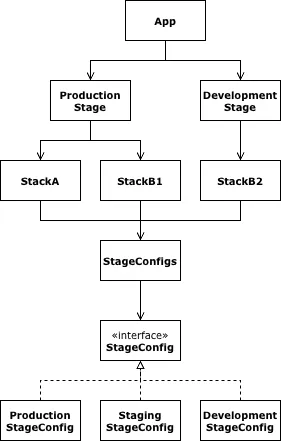
The implementation shown in the previous section works until each stage has the same resources, only differs in configuration. We engineers shall minimize the resources created. The less resources means less cost; less cost is what every business wants. For instance, many do not like duplicating NAT gateways for the staging and development stages. Only team members access to the non-production stage. The traffic is so low. Any non-production stages can share the same network. That saves the company at least $32.40 a month.
In this practice we use the Stage construct, introduced since the AWS CDK v2.
Ideally all our stages must have the same corresponding resources. There is, however, a business requirement to reduce cost. So we will learn how to share one resource between stages. If we understand how to do that, we also understand how to have the same resource across stages, because the latter is easier.
The lib directory structure of this practice is:
lib
├── config
│   ├── development.config.ts
│   ├── production.config.ts
│   ├── stage-config.ts
│   ├── stage-configs.ts
│   └── staging.config.ts
├── stacks
│   ├── stack-a.ts
│   ├── stack-b1.ts
│   └── stack-b2.ts
└── stages
    ├── development-stage.ts
    └── production-stage.ts
Config
The 90% updates from the previous section is to change the names. Inside the static config class, we use the Stage construct instead of Stage.
lib/config/stage-config.ts
import type { InstanceClass, InstanceSize } from 'aws-cdk-lib/aws-ec2';

export interface StageConfig {
  readonly database: {
    readonly allocatedStorage: number;
    readonly instanceType: {
      readonly instanceClass: InstanceClass;
      readonly instanceSize: InstanceSize;
    };
    readonly multiAz: boolean;
  };
  readonly ec2: {
    readonly instanceType: {
      readonly instanceClass: InstanceClass;
      readonly instanceSize: InstanceSize;
    };
  };
}
lib/config/development.config.ts
import { InstanceClass, InstanceSize } from 'aws-cdk-lib/aws-ec2';
import type { StageConfig } from './stage-config';

export const developmentConfig: StageConfig = {
  database: {
    allocatedStorage: 20,
    instanceType: {
      instanceClass: InstanceClass.T4G,
      instanceSize: InstanceSize.MICRO,
    },
    multiAz: false,
  },
  ec2: {
    instanceType: {
      instanceClass: InstanceClass.T4G,
      instanceSize: InstanceSize.MICRO,
    }
  }
}
lib/config/staging.config.ts
import { InstanceClass, InstanceSize } from 'aws-cdk-lib/aws-ec2';
import type { StageConfig } from './stage-config';

export const stagingConfig: StageConfig = {
  database: {
    allocatedStorage: 20,
    instanceType: {
      instanceClass: InstanceClass.T4G,
      instanceSize: InstanceSize.MICRO,
    },
    multiAz: false,
  },
  ec2: {
    instanceType: {
      instanceClass: InstanceClass.T4G,
      instanceSize: InstanceSize.MICRO,
    }
  },
}
lib/config/production.config.ts
import { InstanceClass, InstanceSize } from 'aws-cdk-lib/aws-ec2';
import type { StageConfig } from './stage-config';

export const productionConfig: StageConfig = {
  database: {
    allocatedStorage: 100,
    instanceType: {
      instanceClass: InstanceClass.M7G,
      instanceSize: InstanceSize.LARGE,
    },
    multiAz: true,
  },
  ec2: {
    instanceType: {
      instanceClass: InstanceClass.T4G,
      instanceSize: InstanceSize.XLARGE,
    }
  }
}
lib/config/stage-configs.ts
import { Stage } from 'aws-cdk-lib';
import { Construct } from 'constructs';
import { developmentConfig } from './development.config';
import { stagingConfig } from './staging.config';
import { productionConfig } from './production.config';
import { StageConfig } from './stage-config';

export class StageConfigs {
  private static readonly record: Record<string, StageConfig | undefined> = {
    development: developmentConfig,
    staging: stagingConfig,
    production: productionConfig,
  }

  private static readStage(scope: Construct): Stage {
    const stage = Stage.of(scope);

    if (stage) {
      return stage;
    } else {
      throw new Error('Can\'t get a `Stage` instance; the argument `scope` has no parent `Stage` construct');
    }
  }

  private static readStageConfig(stage: Stage): StageConfig {
    const { stageName } = stage;
    const stageNameLowerCased = stageName.toLocaleLowerCase();

    if (StageConfigs.record[stageName]) {
      return StageConfigs.record[stageName];
    } else if (StageConfigs.record[stageNameLowerCased]) {
      return StageConfigs.record[stageNameLowerCased]
    } else {
      throw new Error('Can\'t find a stage config for ' + `'${stageName}'`);
    }
  }

  public static of(scope: Construct): StageConfig {
    const stage = StageConfigs.readStage(scope);
    const config = StageConfigs.readStageConfig(stage);

    return config;
  }
}
Stacks
We sacrifice codebase for money. In order to make one resources sharable, we create two types of stacks for the same purpose. Staging stage creates a resource. Development stage looks up the resource from staging.
Our StackA consists two resources: VPC and database. These are likely to be shared across stages. This stack must be deployed prior to the deployment of dependant stacks.
lib/stacks/stack-a.ts
import { Stack, StackProps } from 'aws-cdk-lib';
import { InstanceType, Vpc } from 'aws-cdk-lib/aws-ec2';
import { DatabaseInstance, DatabaseInstanceEngine, PostgresEngineVersion, StorageType } from 'aws-cdk-lib/aws-rds';
import { Construct } from 'constructs';
import { StageConfigs } from '../config/stage-configs';

export class StackA extends Stack {
  public readonly vpc: Vpc;

  constructor(scope: Construct, id: string, props?: StackProps) {
    super(scope, id, props);

    const config = StageConfigs.of(this);
    const vpc = new Vpc(this, 'Vpc');
    const databaseInstance = new DatabaseInstance(this, 'Database', {
      allocatedStorage: config.database.allocatedStorage,
      engine: DatabaseInstanceEngine.postgres({
        version: PostgresEngineVersion.VER_18_3,
      }),
      instanceType: InstanceType.of(
        config.database.instanceType.instanceClass,
        config.database.instanceType.instanceSize
      ),
      multiAz: config.database.multiAz,
      storageType: StorageType.GP3,
      vpc,
    });

    this.vpc = vpc;
  }
}
In the staging and production stages, the StackB1 imports VPC from StackA.
lib/stacks/stack-b1.ts
import { Stack, StackProps }from 'aws-cdk-lib/core';
import { Instance, InstanceType, MachineImage, Vpc }from 'aws-cdk-lib/aws-ec2';
import { Construct } from 'constructs';
import { StageConfigs } from '../config/stage-configs';

export class StackB1 extends Stack {
  constructor(scope: Construct, id: string, { vpc, ...props }: StackProps & {
    vpc: Vpc;
  }) {
    super(scope, id, props);

    const config = StageConfigs.of(this);
    const { instanceClass, instanceSize } = config.ec2.instanceType;
    const instance = new Instance(this, 'Instance', {
      instanceType: InstanceType.of(instanceClass, instanceSize),
      machineImage: MachineImage.latestAmazonLinux2023(),
      vpc,
    })
  }
}
In the development stage, the StackB2 references VPC from the staging stage.
lib/stacks/stack-b2.ts
import { Stack, StackProps }from 'aws-cdk-lib/core';
import { Instance, InstanceType, MachineImage, Vpc }from 'aws-cdk-lib/aws-ec2';
import { Construct } from 'constructs';
import { StageConfigs } from '../config/stage-configs';

export class StackB2 extends Stack {
  constructor(scope: Construct, id: string, props?: StackProps) {
    super(scope, id, props);

    const config = StageConfigs.of(this);
    const { instanceClass, instanceSize } = config.ec2.instanceType;
    const vpc = Vpc.fromVpcAttributes(this, 'Vpc', {
      vpcId: 'staging-vpc',
      availabilityZones: ['us-east-1a', 'us-east-1b'],
    });
    const instance = new Instance(this, 'Instance', {
      instanceType: InstanceType.of(instanceClass, instanceSize),
      machineImage: MachineImage.latestAmazonLinux2023(),
      vpc,
    })
  }
}
If we wish, we could combine two types of StackB into one; we just need a if/else statement. We don’t want stacks or its child constructs to be responsible for the multi-stage business. The Stage is for that.
If our stages contain the same corresponding resources, we don’t need two types of StackB. The implementation of StackB above is enough.
Stages
When we share resources across stages, do not let the staging stage borrow resources from the preceding stages like development. Let the preceding stages borrow from the staging, although we must deploy the staging stage before development. Our production and staging stages must be identical.
That said, those two stages can share the same Stage construct. Development stage needs a dedicated Stage.
lib/stages/production-stage.ts
import { Stage, StageProps } from 'aws-cdk-lib';
import { Construct } from 'constructs';
import { StackA } from '../stacks/stack-a';
import { StackB1 } from '../stacks/stack-b1';

export class ProductionStage extends Stage {
  constructor(scope: Construct, id: string, props?: StageProps) {
    super(scope, id, props);

    const stackA = new StackA(this, 'StackA');
    const stackB = new StackB1(this, 'StackB', {
      vpc: stackA.vpc,
    });
  }
}
lib/stages/development-stage.ts
import { Stage, StageProps } from 'aws-cdk-lib';
import { Construct } from 'constructs';
import { StackB2 } from '../stacks/stack-b/stack-b2';

export class DevelopmentStage extends Stage {
  constructor(scope: Construct, id: string, props?: StageProps) {
    super(scope, id, props);

    // StackA is shared with the `staging` stage
    const stackB = new StackB2(this, 'StackB');
  }
}
If we don’t share resources across stages, we need one custom Stage class.
App
Again, our executable is cleaner than ever.
bin/app.ts
#!/usr/bin/env node
import { App } from 'aws-cdk-lib/core';
import { DevelopmentStage } from '../lib/stages/development-stage';
import { ProductionStage } from '../lib/stages/production-stage';

const app = new App();
new DevelopmentStage(app, 'Development', {
  stageName: 'development',
});
new ProductionStage(app, 'Staging', {
  stageName: 'staging',
});
new ProductionStage(app, 'Production', {
  stageName: 'production',
});
The commands to deploy each stack of each stage are:
cdk deploy Development/StackB

cdk deploy Staging/StackA
cdk deploy Staging/StackB

cdk deploy Production/StackA
cdk deploy Production/StackB
Stage Construct and Decentralized Stage Config
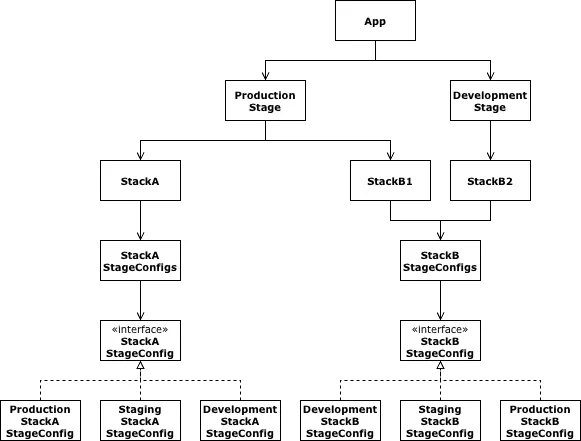
The implementation shown in the previous section works until infrastructure becomes massive. One simple root configuration file is too much for humans. We could separate the root config file into resource level, although doing so increase the number of files and makes it harder to relate one config file to the target resource. Mirroring the folder structure of stacks lets us move forward. Yet annoyance is always behind us. Let's come up with the new solution: decentralization.
Inside decentralized CDK application, each construct has its own configuration and config management class. Each construct is oblivious to other construct’s configuration. Independence from other components and close relationship within the component is more understandable than the big interconnected component. Small is new big.
The lib directory structure of this practice is:
lib
├── config
│   └── stage-configs.ts
├── stacks
│   ├── stack-a
│   │   ├── config
│   │   │   ├── development.stack-a-stage-config.ts
│   │   │   ├── production.stack-a-stage-config.ts
│   │   │   ├── stack-a-stage-config.ts
│   │   │   ├── stack-a-stage-configs.ts
│   │   │   └── staging.stack-a-stage-config.ts
│   │   └── stack-a.ts
│   └── stack-b
│       ├── config
│       │   ├── development.stack-b-stage-config.ts
│       │   ├── production.stack-b-stage-config.ts
│       │   ├── stack-b-stage-config.ts
│       │   ├── stack-b-stage-configs.ts
│       │   └── staging.stack-b-stage-config.ts
│       ├── stack-b1.ts
│       └── stack-b2.ts
└── stages
    ├── development-stage.ts
    └── production-stage.ts
Config
We already have a blueprint for decentralization. We need to make StageConfigs stack able to be an instance.
lib/config/stage-configs.ts
import { Stage } from 'aws-cdk-lib';
import { Construct } from 'constructs';

export class StageConfigs<T> {
  constructor(private readonly record: Record<string, T | undefined>) {}

  private readStage(scope: Construct): Stage {
    const stage = Stage.of(scope);

    if (stage) {
      return stage;
    } else {
      throw new Error('Can\'t get a `Stage` instance; the argument `scope` has no parent `Stage` construct.');
    }
  }

  private readStageConfig(stage: Stage): T {
    const { stageName } = stage;
    const stageNameLowerCased = stageName.toLocaleLowerCase();

    if (this.record[stageName]) {
      return this.record[stageName];
    } else if (this.record[stageNameLowerCased]) {
      return this.record[stageNameLowerCased]
    } else {
      throw new Error('Can\'t find a stage config for ' + `'${stageName}'`);
    }
  }

  public of(scope: Construct): T {
    const stage = this.readStage(scope);
    const stageConfig = this.readStageConfig(stage);

    return stageConfig;
  }
}
Stack A
Unlike implementations introduced in the previous two sections, configuration objects are defined at construct level. In our example, the smallest configurable construct is Stack.
Stack A’s config
StackA consists a DatabaseInstance construct. We need stage configurations for that construct since we need different specs for different stages. We have the interface for the configuration of database in the previous section. We extract a property for the database.
lib/stacks/stack-a/config/stack-a-stage-config.ts
import type { InstanceClass, InstanceSize } from 'aws-cdk-lib/aws-ec2';

export interface StackAStageConfig {
  readonly database: {
    readonly allocatedStorage: number;
    readonly instanceType: {
      readonly instanceClass: InstanceClass;
      readonly instanceSize: InstanceSize;
    };
    readonly multiAz: boolean;
  };
}
Changing names, copying and pasting, we have three stage configuration objects for StackA.
lib/stacks/stack-a/config/development.stack-a-stage-config.ts
import { InstanceClass, InstanceSize } from 'aws-cdk-lib/aws-ec2';
import type { StackAStageConfig } from './stack-a-stage-config';

export const developmentStackAStageConfig: StackAStageConfig = {
  database: {
    allocatedStorage: 20,
    instanceType: {
      instanceClass: InstanceClass.T4G,
      instanceSize: InstanceSize.MICRO,
    },
    multiAz: false,
  },
}
lib/stacks/stack-a/config/staging.stack-a-stage-config.ts
import { InstanceClass, InstanceSize } from 'aws-cdk-lib/aws-ec2';
import type { StackAStageConfig } from './stack-a-stage-config';

export const stagingStackAStageConfig: StackAStageConfig = {
  database: {
    allocatedStorage: 20,
    instanceType: {
      instanceClass: InstanceClass.T4G,
      instanceSize: InstanceSize.MICRO,
    },
    multiAz: false,
  },
}
lib/stacks/stack-a/config/production.stack-a-stage-config.ts
import { InstanceClass, InstanceSize } from 'aws-cdk-lib/aws-ec2';
import type { StackAStageConfig } from './stack-a-stage-config';

export const productionStackAStageConfig: StackAStageConfig = {
  database: {
    allocatedStorage: 100,
    instanceType: {
      instanceClass: InstanceClass.M7G,
      instanceSize: InstanceSize.LARGE,
    },
    multiAz: true,
  },
}
lib/stacks/stack-a/config/stack-a-configs.ts
import { developmentStackAStageConfig } from './development.stack-a-stage-config';
import { stagingStackAStageConfig } from './staging.stack-a-stage-config';
import { productionStackAStageConfig } from './production.stack-a-stage-config';
import { StageConfigs } from '../../../config/stage-configs';

export const stackAStageConfigs = new StageConfigs({
  development: developmentStackAStageConfig,
  staging: stagingStackAStageConfig,
  production: productionStackAStageConfig,
});
Boom! Creating an instance of StageConfigs class, we have a decentralized, multi-stage configuration object.
Stack A’s Stack
The implementation of Stack A is different, from the previous section, only in that it loads configuration not from the root config object but from its own config object.
lib/stacks/stack-a/stack-a.ts
import { Stack, StackProps } from 'aws-cdk-lib';
import { InstanceType, Vpc } from 'aws-cdk-lib/aws-ec2';
import { DatabaseInstance, DatabaseInstanceEngine, PostgresEngineVersion, StorageType } from 'aws-cdk-lib/aws-rds';
import { Construct } from 'constructs';
import { stackAStageConfigs } from './config/stack-a-stage-configs';

export class StackA extends Stack {
  public readonly vpc: Vpc;

  constructor(scope: Construct, id: string, props?: StackProps) {
    super(scope, id, props);

    const config = stackAStageConfigs.of(this);
    const vpc = new Vpc(this, 'Vpc');
    const databaseInstance = new DatabaseInstance(this, 'Database', {
      allocatedStorage: config.database.allocatedStorage,
      engine: DatabaseInstanceEngine.postgres({
        version: PostgresEngineVersion.VER_18_3,
      }),
      instanceType: InstanceType.of(
        config.database.instanceType.instanceClass,
        config.database.instanceType.instanceSize
      ),
      multiAz: config.database.multiAz,
      storageType: StorageType.GP3,
      vpc,
    });

    this.vpc = vpc;
  }
}
Stack B
We undergo the same process we took for Stack A. No further explanation is required. If you haven't read the previous section, you might want to check how we handle the resource sharing.
Stack B’s Config
lib/stacks/stack-b/config/stack-b-stage-config.ts
import type { InstanceClass, InstanceSize } from 'aws-cdk-lib/aws-ec2';

export interface StackBStageConfig {
  readonly ec2: {
    readonly instanceType: {
      readonly instanceClass: InstanceClass;
      readonly instanceSize: InstanceSize;
    };
  };
}
lib/stacks/stack-b/config/development.stack-b-stage-config.ts
import { InstanceClass, InstanceSize } from 'aws-cdk-lib/aws-ec2';
import type { StackBStageConfig } from './stack-b-stage-config';

export const developmentStackBStageConfig: StackBStageConfig = {
  ec2: {
    instanceType: {
      instanceClass: InstanceClass.T4G,
      instanceSize: InstanceSize.MICRO,
    }
  },
}
lib/stacks/stack-b/config/staging.stack-b-stage-config.ts
import { InstanceClass, InstanceSize } from 'aws-cdk-lib/aws-ec2';
import type { StackBStageConfig } from './stack-b-stage-config';

export const stagingStackBStageConfig: StackBStageConfig = {
  ec2: {
    instanceType: {
      instanceClass: InstanceClass.T4G,
      instanceSize: InstanceSize.MICRO,
    }
  },
}
lib/stacks/stack-b/config/production.stack-b-stage-config.ts
import { InstanceClass, InstanceSize } from 'aws-cdk-lib/aws-ec2';
import type { StackBStageConfig } from './stack-b-stage-config';

export const productionStackBStageConfig: StackBStageConfig = {
  ec2: {
    instanceType: {
      instanceClass: InstanceClass.T4G,
      instanceSize: InstanceSize.XLARGE,
    }
  },
}
lib/stacks/stack-b/config/stack-b-stage-configs.ts
import { developmentStackBStageConfig } from './development.stack-b-stage-config';
import { stagingStackBStageConfig } from './staging.stack-b-stage-config';
import { productionStackBStageConfig } from './production.stack-b-stage-config';
import { StageConfigs } from '../../../config/stage-configs';

export const stackBStageConfigs = new StageConfigs({
  development: developmentStackBStageConfig,
  staging: stagingStackBStageConfig,
  production: productionStackBStageConfig,
});
Stack B’s Stack
lib/stacks/stack-b/stack-b1.ts
import { Stack, StackProps }from 'aws-cdk-lib/core';
import { Instance, InstanceType, MachineImage, Vpc }from 'aws-cdk-lib/aws-ec2';
import { Construct } from 'constructs';
import { stackBStageConfigs } from './config/stack-b-stage-configs';

export class StackB1 extends Stack {
  constructor(scope: Construct, id: string, { vpc, ...props }: StackProps & {
    vpc: Vpc;
  }) {
    super(scope, id, props);

    const config = stackBStageConfigs.of(this);
    const { instanceClass, instanceSize } = config.ec2.instanceType;
    const instance = new Instance(this, 'Instance', {
      instanceType: InstanceType.of(instanceClass, instanceSize),
      machineImage: MachineImage.latestAmazonLinux2023(),
      vpc,
    })
  }
}
lib/stacks/stack-b/stack-b2.ts
import { Stack, StackProps }from 'aws-cdk-lib/core';
import { Instance, InstanceType, MachineImage, Vpc }from 'aws-cdk-lib/aws-ec2';
import { Construct } from 'constructs';
import { stackBStageConfigs } from './config/stack-b-stage-configs';

export class StackB2 extends Stack {
  constructor(scope: Construct, id: string, props?: StackProps) {
    super(scope, id, props);

    const config = stackBStageConfigs.of(this);
    const { instanceClass, instanceSize } = config.ec2.instanceType;
    const vpc = Vpc.fromVpcAttributes(this, 'Vpc', {
      vpcId: 'staging-vpc',
      availabilityZones: ['us-east-1a', 'us-east-1b'],
    });
    const instance = new Instance(this, 'Instance', {
      instanceType: InstanceType.of(instanceClass, instanceSize),
      machineImage: MachineImage.latestAmazonLinux2023(),
      vpc,
    })
  }
}
Stages
The implementation of stages is identical to the one from the previous section. We only modify the import paths.
lib/stages/production-stage.ts
import { Stage, StageProps } from 'aws-cdk-lib';
import { Construct } from 'constructs';
import { StackA } from '../stacks/stack-a/stack-a';
import { StackB1 } from '../stacks/stack-b/stack-b1';

export class ProductionStage extends Stage {
  constructor(scope: Construct, id: string, props?: StageProps) {
    super(scope, id, props);

    const stackA = new StackA(this, 'StackA');
    const stackB = new StackB1(this, 'StackB', {
      vpc: stackA.vpc,
    });
  }
}
lib/stages/development-stage.ts
import { Stage, StageProps } from 'aws-cdk-lib';
import { Construct } from 'constructs';
import { StackB2 } from '../stacks/stack-b/stack-b2';

export class DevelopmentStage extends Stage {
  constructor(scope: Construct, id: string, props?: StageProps) {
    super(scope, id, props);

    // StackA is shared with the `staging` stage
    const stackB = new StackB2(this, 'StackB');
  }
}
App
Again and again, our executable is cleaner than ever.
bin/app.ts
#!/usr/bin/env node
import { App } from 'aws-cdk-lib/core';
import { DevelopmentStage } from '../lib/stages/development-stage';
import { ProductionStage } from '../lib/stages/production-stage';

const app = new App();
new DevelopmentStage(app, 'Development', {
  stageName: 'development',
});
new ProductionStage(app, 'Staging', {
  stageName: 'staging',
});
new ProductionStage(app, 'Production', {
  stageName: 'production',
});
The commands to deploy each stack of each stage are:
cdk deploy Development/StackB

cdk deploy Staging/StackA
cdk deploy Staging/StackB

cdk deploy Production/StackA
cdk deploy Production/StackB
Summary
I introduced us to the three best practices how to implement CDK application for multi-stage deployment.
“Which one is the best?” you ask.
“It depends,” I answer.
Prioritization determines the best practice. Decentralization is scalable. Decentralization is overwork for the small infrastructure. Stack level configuration fits small infrastructure.
Combining the account strategies listed in the previous article, we draw the journey map of CDK infrastructure for multiple stages.
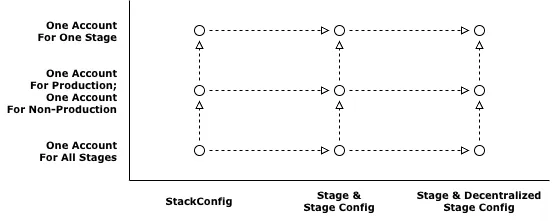
As infrastructure grows, the CDK project evolves to the decentralized stage configuration. As a team grows along with infrastructure, the team will have one AWS account for each stage. Infrastructure journey map doesn’t have any diagonal path. Changing config implementation for multi-stage and separating accounts for stages at once is possible. But two incremental changes are better than an extreme change.
Each team decides where to start on the map. The journey of CDK development has begun.