
The Multi-Account Dilemma: Structuring AWS Environments for Scalable CDK Deployments
AWS Cloud Development Kit(CDK) is an open-source framework that lets you define cloud infrastructure in code (using programming languages like TypeScript, Python, and Java) and provision it through AWS CloudFormation.
A challenge almost every team faces with CDK is when moving from a development to staging, and from staging to production stage. A single repository must be able to deploy the exact same infrastructure logic across multiple stages—multiple environments.
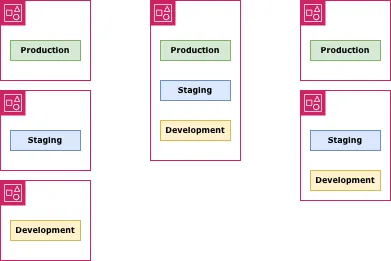
I was going to find out the best practices to deploy CDK app across multi-stages. Then I realized multi-staged CDK deployment involves AWS account management. When we think about AWS account management for the multi-stage infrastructure, we have three models:
- One account for one stage
- One account for all stages
- One account for production; one account for non-production
I will understand the hidden operational friction of each model.
One Account for One Stage
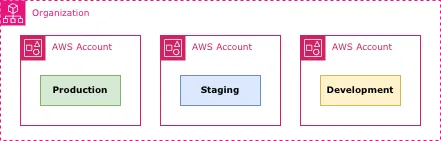
Your first choice is to have one account for each stage if you can afford. And for the enterprise team, this is the only choice. Separating accounts between stages will enhance security boundaries, minimize a blast radius, and reduce engineering cost.
AWS itself recommend this strategy
Security Boundaries
Each stage environment is separated from each other. Security breach into your staging stage, in which all user information is dummy, never affects your production. One application error in the development stage might shut down the entire development resources, but none in the production. Your blast radius is withing the stage.
Separation of accounts enables you to restrict human-user operations as well. Ideally speaking each user must have his or her dedicated policy based on their role but doing so consume lots of time. You split your team into groups according to the stages available and their responsibility. A member can only login the account provided, can only manage the resources in the account. For instance, you want one junior software engineer to login only the development stage. You create a new IAM user in the development account, give the junior engineer a login information. The whole process can take only three minutes, without risking the mis-operation in the production. You can control access even when all stages are hosted in the same account. Nevertheless, doing so makes cost of IAM-policy management threefold—in my opinion.
Not only can you restrict operations of humans but also you can limit the actions of resources. One resource might act on the random resources related in the other service. In such situation you have wildcard(*) in the IAM policy state. Given the wildcard and having the multi-stage resources in one account, a development resources could act on a production resource. That's terrible. Account separation prevents this happen without you even considering it.
Simple Billing
Costs are naturally separated by account, making it easy to track spending for each stage. As your infrastructure grows, you spend more for it. You do not want to pay too much for the staging environment. Nor for the dev env. Login each account, go to the billing page. You can get how much you are paying in that account. This clear sense of cost enables you to optimize the total infrastructure economy. The problem identified is half solved.
Aside billing, you might also interested in service quotas. AWS limits—like concurrent Lambda executions or EC2 limits—are scoped per account. If your application is existing near the quotas, account separation gives you a bit of quota margin. If your team undertakes performance test for every deployment, your heavy test requests will never affect the real user experience.
Trade-offs
Here are what you should be careful though.
Switching accounts too many: On AWS console you can only login one account a time. In order to compare the settings of the resources in the different accounts and stages, you either need to switching account using multi-session or to open a new browser. I believe opening multiple browsers is easier operation than switching session. Still that might hurt your productivity. With three stages—development, staging, and production—you need to open three browsers. You might need to install an extra browser to your computer for that.
Careful CI Deployment: Not being allowed to write your AWS region and your account ID directly in codebase, you should change AWS credential every time you deploy to the different stage. CDK deployment usually obtain this credential through process environment. Whether you are deploying via CI or from local computer terminal, somehow you need to export environment variables before deployment. In CI, you might need a condition in your workflow definition, or to duplicate a task for each stage deployment. In the terminal, you must add a --profile option to cdk command.
And don’t forget. If you make a mistake, your development stage will be on production.
One Account for All Stages
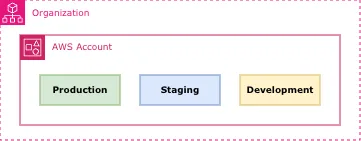
The second model to resolve multi-stage problems in AWS to have all stages in one account. This is your natural choice not being thorough. But it’s not bad at all.
Transparency
Having all stages in one same AWS account, you feel most comfortable being freed from account management, being able to overview your entire infrastructure. The account tells you: “Don’t manage. Just develop.” One account removes most of the drawbacks that comes with the one-account-for-one-stage approach. As speed is your first priority, one account is all you need.
That being said, one-account strategy is good for the small team in which all members are equal and all members have access to all resources. What binds the team is trust, not system. But if there is not enough trust, if the team wants strict access control among the members, policy management vexes you.
Resource Sharing
One account enables you to do one thing that cross-accounts can’t do: sharing the resources. Let’s take an example of NAT Gateway. In North Virginia region, one NAT Gateway costs at least $32.85 a month because of base hourly charge. Sharing the same NAT Gateway between staging and development environments, you can save $32.85 for each NAT Gateway. Database are likely to cost more than computing resources. You can share the database, too. You can save more money. By optimizing the resources between staging-development environments you could save over $100 a month. Your boss would embrace you.
Technically speaking, you can share the resource across different accounts. But the relation of your infrastructure—which resource depends which—will be far more complicated. Complication increase the engineering cost. The amount of cost increase caused by intricate infrastructure exceeds the amount of saving caused by resource-sharing.
Trade-offs
IAM policy nightmare: When the team is small, “give all access to all engineers” works. Your business, however, aims to grow. So does your infrastructure. As your organization becomes bigger, they need more detailed policies who can do what. You will be in need of full-time permission engineer, keeping all stages in one account. That’s not what you want.
Prefixing/tagging dull: You should prefix all your resources with words like dev for stage identification when you work on multi-stages with one account. The CDK library add a hashed suffix to avoid the name collision if you don’t specify resource names. But a hashed name cannot tell you what stage one resource is for. Thus you need prefixes. In addition, the resource tag like Environment:Development helps you organize resources professionally. Cost Allocation Tags and Cost Allocation Reports tells costs you spent for each stage. You will get false reports forgetting to add a resource tag. Be careful.
One Account for Production; One Account for Non-Production
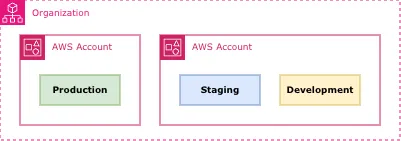
A decent mind sees the hybrid of the two preceding models. You fall in to think you get the best of both worlds. Yes and No.
Binary thinking Paradise
Humans are good at thinking yes and no, good or bad. Binary approach fits for mortals.
Security Boundaries: Simply group resources and team members into two. One group can access only to the production stage; another group can access only to non-production stages. Some members belong to both. How simple is that? It is recommended that, even within the non-production account, the resources in one stage cannot act on the resources in the other stage. You might misconfigure, and an error can happen. But those are contained within the account. It does not damage the production.
You are also freed from anxiety that a junior engineer, who can only mange non-production resources, delete the production resources and whole data.
Resource sharing: All non-production stages can share all sharable resources while keeping the production crown jewels completely safe. Sharing could you save your non-production costs 30-40%. Usually the sharable resources are based on services. Excluding production resources from one account presents you more vividly which resource is shared between the stages.
While development, you compare development stage more often to the staging or to the production stage. Having the staging stage, which is supposed be carbon print of the production, in the same account, your productivity will improve by making cross-stage referencing easy.
All Troubles Together
Upsides of the preceding two models come together. Evils never go away. They are persistent. Downsides come along.
Smarter Deployment Strategy: You must be able to deploy your infrastructures to the different account without delaying the delivery. Switching accounts upon delivery is automatic once CI is set up. Yet the CI development comes with engineering cost. The CI for staging and development is same, although you might need to make an adjustment for production deploy. It is common that to find the sweet spot that works regardless of different or same account requires a smarter solution.
Unnecessary Production Prefixes: In your non-production account the resources require prefixes because two resources for the same purpose cannot have the same name. This fact has nothing to do with production. Nonetheless, your production resources will have prefixes that are unnecessary. Your CDK code must adapt.
Summary
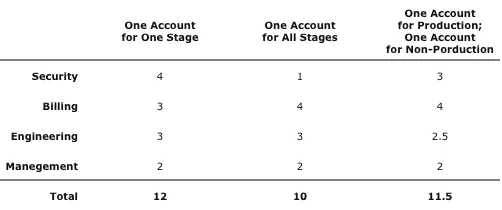
Here is my simple evaluation on the models.
I’ve evaluated each model by four subjects: security, billing(cost), engineering, and management. Each subject is measured 1-4 grade.
To me, pros of each model in one subject even out the cons of other model. So the scores between models vary a little. Security is an exception. In fact, it is wrong to measure the security issue with the same grade as for the other subjects. The grade in security shall weight more.
My point is not that all team must have one account for each stage but that you must make your own judgement knowing the outcome. The momentum is important, especially when the project is young. Do not lose it. Sooner or later, your first priority will be security. Then have a account for each stage.
If you use AWS CDK, the framework itself actually makes model 1 (One account a stage) drastically easier to manage than it used to be with raw CloudFormation, because the CDK handles cross-account asset publishing automatically.